
17 KiB
Introduction
The sub-project Dynasty is an deep learning inference engine. It supports floating point inference and dynamic fixed point inference.
Please read the corresponding part in this file before you do anything or ask any questions.
Though we are at a start-up and need to code fast. It is your responsibility to write good comments and clean codes.
Read the Google C++ Coding Styles and Doxygen Manual.
Before You Start
If you are a consumer of Dynasty, you are supposed to only use the released version in the deployment in the CI/CD pipelines of the release branch or the dev branch. The release may be less updated than dev but more stable.
If you are a developer of Dynasty, you are supposed to build the whole project from source files.
Prerequisites
Dependencies are needed ONLY IF you are a developer of either CUDA or CUDNN; CUDA 10.1.243 is required.
To install CUDA is painful, I encourage you to use Nvidia's docker. See this README for details.
To install CUDNN, follow this guide. Or refer to the CI Dockerfile.
Features
- Use builder, pimpl, visitor, chain of responsibility, template method patterns; the inferencer interfaces are clean and easy to extend to CUDA, OpenCL, MKL, etc;
- The whole project will be compiled to a single static library;
- The project has a flexible CMakeList and is able to be compiled in any platform; it will compile a dummy version of inferencer which is not possible in the current platform, for example, a dummy CUDAInferencer on desktops without GPU.
- Have a user-friendly integration test framework; only need to edit a JSON file for more test cases;
- The CI system is built into an Docker image (ctrl-click-me), which is highly portable.
- Pure OOD, users only need to work with interfaces;
Performance
Profile
I add a smart build
rm -rf build && mkdir build && cd build && cmake .. -DBUILD_DYNASTY_STATIC_LIB=ON -PROFILE_NODES=ON && make -j8
Supported Operations
See the section Latest Supported Operations here.
Build
When you start development
You may want to build the Dynasty, run tests, but not upgrade the library.
# enter the Piano project root
rm -rf build && mkdir build && cd build && cmake .. -DBUILD_DYNASTY_STATIC_LIB=ON && make -j8
# do not make install!!!
iOS BUILD (when you have Mac OS environment and XCode):
# go to Piano project root
rm -rf build && mkdir build && cd build
cmake -DCMAKE_TOOLCHAIN_FILE=../compiler/toolchains/ios.toolchain.cmake -DENABLE_BITCODE=OFF -DBUILD_IOS=ON ..
make -j
# do not make install !!!
When you finish development
You may want to create a pull request and upgrade the libraries. DO NOT UPGRADE LIBS WITHOUT GRANT.
- Make sure the compiling works
- Run all the tests and make sure tests passed
- Increment version numbers of Dynasty in CMakeLists.txt. Refer to version control doc
- Update readme files; record your changes, e.g. operation_xx [N] -> operation_xx [Y]
- Push your changes to your remote rep, monitor the pipelines;
- Create a PR if everything works;
Usage of the Inferencer Binary
After building Dynasty as what instructed above,
$ ./build/dynasty/run_inferencer

Kneron's Neural Network Inferencer
Usage:
  Inferencer [OPTION...]

  -i, --input arg   input config json file
  -e, --encrypt     use encrypted model or not
  -t, --type arg    inferencer type; AVAILABLE CHOICES: CPU, CUDA, SNPE, CUDNN, MKL, MSFT
  -h, --help        optional, print help
  -d, --device arg  optional, gpu device number
  -o, --output arg  optional, path_to_folder to save the outputs; CREATE THE
                    FOLDER BEFORE CALLING THE BINARY
--input
The input file now is a Json file. You should specify the input data-path names and corresponding file stored vectors, which guarantees the input order.
{
  "model_path": "/path/to/example.onnx",  # or "/path/to/example.onnx.bie"
  "model_input_txts": [
    {
      "data_vector": "/path/to/input_1_h_w_c.txt",
      "operation_name": "input_1_o0"
    },
    {
      "data_vector": "/path/to/input_2_h_w_c.txt",
      "operation_name": "input_2_o0"
    }
  ]
}
--encrypt
The options are true or false. If true, the input models should be bie files; if false, the input models should be onnx files.
--type
-
CPU: Kneron's old CPU codes; support almost any operation but without accelerations or optimizations;
-
CUDA: Kneron's CUDA codes; reasonable performance;
-
SNPE: Qualcomm's Snapdragon Neural Processing Engine on Qualcomm devices
-
CUDNN: Kneron's GPU codes using CUDNN; good performance; the operations CUDNN does not support will fall back to CUDA codes;
-
MSFT: Kneron's CPU codes using ONNXRuntime; good performance; has constraints in operations; see error messages there are problems with some operations;
-
MKL: Kneron's CPU codes using MKL-DNN; good performance; the operations MKL-DNN does not support will fall back to old CPU codes;
--device
Necessary for CUDA, CUDNN, MKL inferencers. Other inferencers will ignore this option.
--output
If the output directory is specified, all outputs will be stored in that directory. The name of each file is the name of each output operation.
Usage of Libraries
To get an instance of a specific type of inferencer, you should use the builder of a specific implementation.
The order of builder matters.
WithDeviceID(uint i): valid for CUDNN, CUDA, MKL inferencers;WithGraphOptimization(uint i): 0 or 1; 0 means no optimization; 1 means do some optimizations to the graph;WithONNXModel(string s): path to the ONNX model;Build(): build the instance;
For example, to build a CPU Inferencer;
#include <memory>

#include "AbstractInferencer.h"
#include "PianoInferencer.h"
#include "CPUInferencer.h"

using std::unique_ptr;

int main() {
    using dynasty::inferencer::cpu::Inferencer;
    auto inferencer =
        Inferencer<float>::GetBuilder()->WithGraphOptimization(1)->WithONNXModel("res/example_prelu.origin.hdf5.onnx")->Build();
    inferencer->Inference("res/input_config.json");
}
The instance has several interfaces to do inference.
/**
 *  \param preprocess_input: [{operation_node_name, 1d_vector}]
 *  \brief interface need to be implemented, pack output data path names and their float vectors then return
 *  \return name_value_pair: {operation node name: corresponding float vector}
 */
std::unordered_map<std::string, std::vector<T>> Inference(
    std::unordered_map<std::string, std::vector<T>> const &preprocess_input, bool only_output_layers = true);

/**
 *  \param preprocess_input: [{operation_node_name, path_to_1d_vector}]
 *  \brief interface to inference from operation_name and txt pairs
 *  \return name_value_pair: {operation node name: corresponding float vector}
 */
virtual std::unordered_map<std::string, std::vector<T>> Inference(
    std::unordered_map<std::string, std::string> const &preprocess_input, bool only_output_layers = true);

/**
 *  \param preprocess_input_config: a json file specify the config
 *  {
      "model_input_txts": [
        {
          "data_vector": "/path/to/input_1_h_w_c.txt",
          "operation_name": "input_1_o0"
        },
        {
          "data_vector": "/path/to/input_2_h_w_c.txt",
          "operation_name": "input_2_o0"
        }
      ]
    }
    only_output_layers: if true, will only return results of output operations,
        otherwise will return results of all operations
 *  \brief interface to inference from a config file
 *  \return name_value_pair: {operation node name: corresponding float vector}
 */
std::unordered_map<std::string, std::vector<T>> Inference(std::string const &preprocess_input_config,
    bool only_output_layers = true);
See the corresponding headers for more details.
Test
After building Dynasty as what instructed above, you need to download the testing models, which is in the server (@10.200.210.221:/home/nanzhou/piano_new_models) mounted by NFS. Follow the commands below to get models,
sudo apt install nfs-common
sudo vim /etc/fstab
# add the following line
# 10.200.210.221:/home/nanzhou/piano_new_models /mnt/nfs-dynasty nfs ro,soft,intr,noatime,x-gvfs-show
sudo mkdir /mnt/nfs-dynasty
sudo mount -a -v
Now you can access the server’s model directory in your file manager.
Then run the following commands for different inferencers. Note that the model paths in test_config_cuda.json are by default
directed to /mnt/nfs-dynasty.
$ ./build/dynasty/test/inferencer_integration_tests --CPU dynasty/test/conf/test_config_cpu.json
$ ./build/dynasty/test/inferencer_integration_tests -e --CPU dynasty/test/conf/test_config_cpu_bie.json # -e means use bie files
$ ./build/dynasty/test/inferencer_integration_tests --CUDA dynasty/test/conf/test_config_cuda.json
$ ./build/dynasty/test/inferencer_integration_tests --CUDNN dynasty/test/conf/test_config_cudnn.json
$ ./build/dynasty/test/inferencer_integration_tests --MSFT dynasty/test/conf/test_config_msft.json
$ ./build/dynasty/test/inferencer_integration_tests -e --MSFT dynasty/test/conf/test_config_msft_enc.json
$ ./build/dynasty/test/inferencer_integration_tests --MKL dynasty/test/conf/test_config_mkl.json
$ ./build/dynasty/test/inferencer_integration_tests --SNPE dynasty/test/conf/test_config_snpe.json
If you want to change the test case. See the instructions here.
CI & Docker
Testing should be fully automatic and the environment should be as clean as possible. Setting the CI system on a physical machine is not clean at all since it is very hard to do version control for dependencies on shared machines. As a result, we build a docker image that has all the necessary dependencies for the CI system.
Since the --gpu option is still under development,
we do not use the docker executor of Gitlab runner. Instead,
we install a GitLab-runner executor inside the image and use the shell executor inside a running container. It is not perfect since it is difficult to scale. However, in a start-up with around 30 engineers, scaling is not a big concern.
Another issue is regarding where to store the files. We decide to use a read-only NFS volume. The NFS server runs on the physical machine. The advantages are that now states are kept out of images, and we have a good consistency since only the server keeps the states.
As a conclusion, we converged into using docker with NFS volume to build CI. Follow the instructions below to build a fresh CI system.
Physical Machine Requirement
Find a server, which satisfies
- GNU/Linux x86_64 with kernel version > 3.10
- NVIDIA GPU with Architecture > Fermi (2.1)
- NVIDIA drivers ~= 361.93 (untested on older versions)
Install Docker
Please install the Docker of version >= 19.03. The fastest way to install docker is
curl -fsSL https://get.docker.com -o get-docker.sh
sh get-docker.sh
After which, get the nvidia-container-toolkit,
curl -s -L https://nvidia.github.io/nvidia-docker/gpgkey | \
  sudo apt-key add -
distribution=$(. /etc/os-release;echo $ID$VERSION_ID)
curl -s -L https://nvidia.github.io/nvidia-docker/$distribution/nvidia-docker.list | \
  sudo tee /etc/apt/sources.list.d/nvidia-docker.list
sudo apt-get update
sudo apt-get install -y nvidia-container-toolkit
sudo systemctl restart docker
Build or Pull the Image
If the latest image is already in DockerHub, you only need to pull it,
sudo docker login -u nanzhoukneron
# the image name may vary
sudo docker pull nanzhoukneron/kneron_ci:nvcc_cmake_valgrind_gitlabrunner_sdk-1.0
Otherwise build and push it. See and modify the bash codes if necessary.
sh dynasty/test/docker/cuda/build.sh 1.0
Enable a NFS Server
Start an NFS server following the commands below,
sudo apt install nfs-kernel-server
sudo vim /etc/exports
# add the following line
# /home/nanzhou/piano_dynasty_models 10.200.210.0/24(ro,sync,root_squash,subtree_check)
sudo exportfs -ra
sudo chmod 777 /home/nanzhou/piano_dynasty_models
sudo chmod 777 /home/nanzhou/piano_dynasty_models/*
sudo chmod 666 /home/nanzhou/piano_dynasty_models/*/*
Create an NFS Volume
# change the server address if necessary
sudo docker volume create --opt type=nfs --opt o=addr=10.200.210.221,ro --opt device=:/home/nanzhou/piano_dynasty_models dynasty-models-volume
Start a Container Attached with the NFS volume
### Create a directory to store the gitlab-runner configuration
sudo mkdir cuda-runner-dir && cd cuda-runner-dir

### Start a container, change the image tag if necessary
### Please be aware of the gpu that is assigned to the docker container
### If written "--gpus all" means assigning all gpus available to the container, in which cudnn inferencer
### will crash if chosen gpu device other than 0 (Reasons Unknown). Therefore, please assign only 1 GPU to
### container and also relieve pressure on the V100 devoted for training only.
sudo docker run -it \
    -v dynasty-models-volume:/home/zhoun14/models \
    -v ${PWD}:/etc/gitlab-runner/ \
    --name piano-cuda \
    --network host \
     --gpus device=0 \
    nanzhoukneron/kneron_ci:nvcc_cmake_valgrind_gitlabrunner_sdk-1.0 bash

### Register a gitlab runner inside the container
root@compute01:/home/zhoun14# gitlab-runner register
Runtime platform                                    arch=amd64 os=linux pid=16 revision=05161b14 version=12.4.1
Running in system-mode.

Please enter the gitlab-ci coordinator URL (e.g. https://gitlab.com/):
http://192.168.200.1:8088/
Please enter the gitlab-ci token for this runner:
fLkY2cT78Wm2Q3G2D8DP
Please enter the gitlab-ci description for this runner:
[compute01]: nvidia stateless runner for CI
Please enter the gitlab-ci tags for this runner (comma separated):
piano-nvidia-runner
Registering runner... succeeded                     runner=fLkY2cT7
Please enter the executor: docker-ssh+machine, docker-ssh, ssh, docker+machine, shell, virtualbox, kubernetes, custom, docker, parallels:
shell
Runner registered successfully. Feel free to start it, but if it's running already the config should be automatically reloaded!
root@compute01:/home/zhoun14# gitlab-runner run
Runtime platform                                    arch=amd64 os=linux pid=39 revision=05161b14 version=12.4.1
Starting multi-runner from /etc/gitlab-runner/config.toml ...  builds=0
Running in system-mode.

Configuration loaded                                builds=0
Locking configuration file                          builds=0 file=/etc/gitlab-runner/config.toml pid=39
listen_address not defined, metrics & debug endpoints disabled  builds=0
[session_server].listen_address not defined, session endpoints disabled  builds=0
Now, a single-node CI system has run successfully. It is sufficient for small projects. You can edit the file config.toml in cuda-runner-dir dir
for higher parallelism.
Design Patterns
We highly recommend you read the following diagrams.
-
Interfaces and Implementations of Inferencers
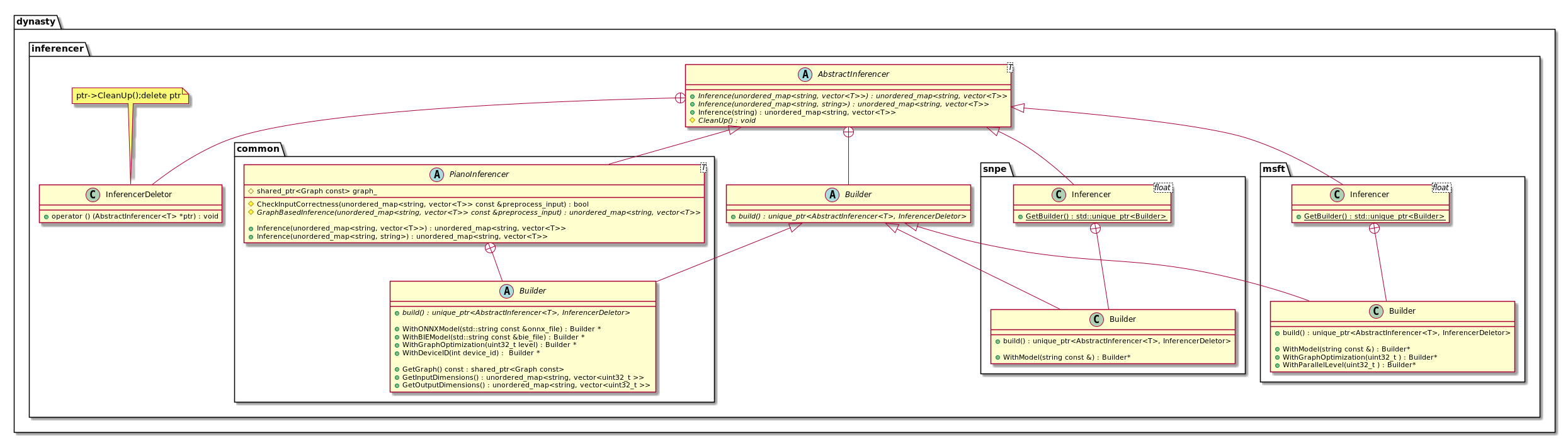
-
An example: Implementations of CPUInferencer
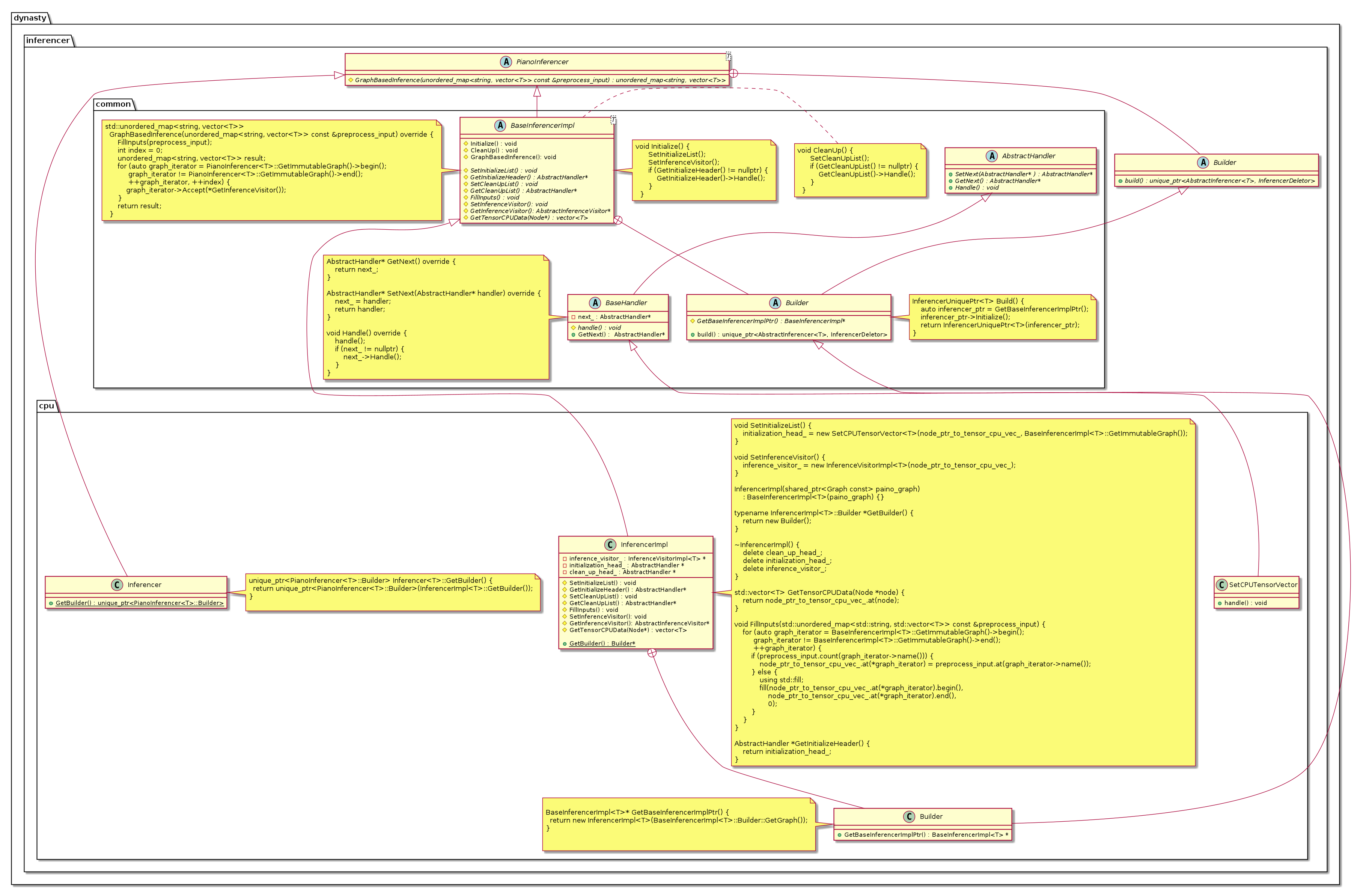
-
Other Utils and Namespaces

Template Method
Typical Usage:
- The pure virtual functions
Inference,GraphBasedInferenceand their overloads; - The functions
InitializeandCleanUpof inferencer defined inBaseInferencerImpl;
Builder
Each Inferencer implementation has a builder. We don't implement a builder in the abstract classes. Since we want that if the user only uses CPUInferencer, the compiled executables will not contain objects of other inferencers.
Chain of responsibility
Typical Usage:
- Handler used in
InitializeandCleanUp.
Chain of responsibility helps us easily achieve:
- operations not supported by CUDNN inferencer will fall back into CUDA inferencer;
- operations not supported by MKL inferencer will fall back into CPU inferencer;
PImpl
PImpl is used to hide headers for all inferencers which extends BaseInferencerImpl.
Development
In order to add a new inferencer, please implement the Inferencer Interface with corresponding builder. If the inferencer utilizes Piano's graph, we highly recommend you extends the class BaseInferencerImpl.
Coding Style
We strictly follow the Google Coding style.